HIPAA Compliance Checklist for Dental Practices: A Complete Guide to Protecting Patient Data
Learn the complete HIPAA compliance checklist for dental practices. Discover how dentists can protect patient data, secure IT systems, and maintain compliance with help from LA Dental IT.
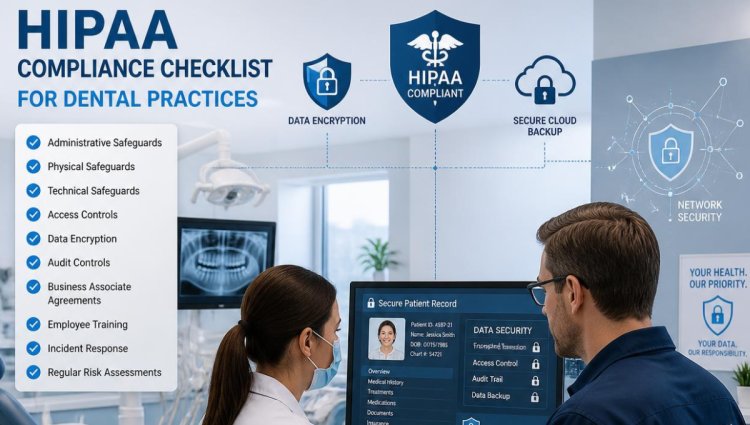
Modern dental practices rely heavily on technology for patient records, appointment scheduling, digital imaging, billing, and communication. While these tools improve efficiency and patient care, they also create new security challenges. Protecting sensitive patient information is not only a responsibility but also a requirement under the Health Insurance Portability and Accountability Act (HIPAA).
A HIPAA violation can result in financial penalties, legal problems, loss of patient trust, and damage to your dental practice reputation. This is why having a strong HIPAA compliance checklist for dental practices is essential.
Dental offices must ensure that their technology infrastructure, software systems, employees, and security processes work together to protect Protected Health Information (PHI). Companies like LA Dental IT help dental practices maintain secure and compliant IT environments through specialized dental IT support, cybersecurity solutions, backup services, and HIPAA compliance assistance.
Why HIPAA Compliance Matters for Dental Practices
Dental offices handle some of the most sensitive information about patients, including:
- Personal identification details
- Medical history
- Dental records
- Insurance information
- X-rays and digital images
- Treatment plans
Cybercriminals often target healthcare organizations because patient data has significant value. A weak security system can expose your practice to ransomware attacks, phishing scams, unauthorized access, and data breaches.
HIPAA compliance helps dental practices create safeguards that protect patient information while ensuring that employees follow proper security procedures.
HIPAA Compliance Checklist for Dental Practices
1. Conduct a HIPAA Risk Assessment
The first step toward compliance is understanding your current security risks.
A dental practice should regularly evaluate:
- How patient information is stored
- Who has access to sensitive records
- How data moves between systems
- Current cybersecurity protections
- Potential vulnerabilities in software and hardware
A risk assessment helps identify weaknesses before they become serious security issues.
Many dental practices partner with specialized dental IT providers because IT experts understand the unique technology requirements of dental offices.
2. Secure Dental Practice Management Software
Dental offices depend on software platforms for daily operations, including scheduling, billing, imaging, and patient records.
Popular dental software systems require proper configuration, updates, and security management.
Your checklist should include:
- Keep dental software updated
- Install security patches regularly
- Restrict access based on employee roles
- Use strong passwords
- Monitor software activity
- Remove access for former employees
LA Dental IT provides dental software support to help practices maintain reliable and secure systems while reducing downtime.
3. Implement Strong Access Controls
Not every employee needs access to all patient information.
Dental practices should follow the principle of "minimum necessary access," meaning employees only receive access required for their job responsibilities.
Best practices include:
- Unique user accounts for every employee
- Multi-factor authentication (MFA)
- Strong password policies
- Automatic account lockouts
- Regular access reviews
Sharing passwords between employees is one of the most common security mistakes in healthcare environments.
4. Protect Your Dental Office Network
Your network connects computers, servers, imaging devices, printers, and other dental equipment. A poorly secured network can expose your entire practice.
A secure dental network should include:
- Firewall protection
- Network monitoring
- Secure Wi-Fi configuration
- Regular security updates
- Endpoint protection
- Intrusion detection
Professional dental IT support services can monitor your systems and identify problems before they affect your practice.
LA Dental IT provides services such as 24/7 server monitoring, endpoint protection, and proactive maintenance designed specifically for dental practices.
5. Create a Data Backup and Disaster Recovery Plan
Data loss can happen because of:
- Ransomware attacks
- Hardware failure
- Employee mistakes
- Natural disasters
- Software problems
A HIPAA-compliant dental practice should maintain secure backups of important information.
Your backup checklist should include:
- Automated backups
- Encrypted backup storage
- Cloud backup solutions
- Regular backup testing
- Disaster recovery procedures
A backup is only useful if your practice can restore data quickly after an emergency.
6. Train Employees on HIPAA Security Practices
Employees are one of the most important parts of your cybersecurity strategy.
Regular HIPAA training should cover:
- Recognizing phishing emails
- Protecting passwords
- Handling patient information
- Avoiding unauthorized data sharing
- Reporting security incidents
Even the strongest technology cannot protect a practice if employees accidentally expose sensitive information.
7. Use HIPAA-Compliant IT Support
Managing HIPAA compliance internally can be challenging, especially for smaller dental offices without dedicated IT staff.
A specialized dental IT provider can help with:
- Security monitoring
- Compliance support
- Software troubleshooting
- Network management
- Backup solutions
- Cybersecurity protection
LA Dental IT focuses specifically on dental practices by providing HIPAA and PCI compliance support, secure backups, monitoring, and dental technology solutions.
8. Maintain Business Associate Agreements (BAAs)
HIPAA requires dental practices to have agreements with vendors that handle patient information.
A Business Associate Agreement confirms that vendors understand their responsibility to protect PHI.
Dental offices should review agreements with:
- IT providers
- Cloud storage companies
- Software vendors
- Billing companies
- Communication platforms
Always verify that technology partners follow HIPAA security requirements.
9. Protect Mobile Devices and Remote Access
Many dental practices allow employees or providers to access information remotely.
Remote access should include:
- Encrypted connections
- Secure VPN access
- Device authentication
- Mobile device management
- Remote data wiping capabilities
Unsecured laptops, tablets, and mobile devices can become major security risks.
10. Monitor and Update Security Regularly
HIPAA compliance is not a one-time task. Security threats constantly change, so dental practices must continuously improve their systems.
Regular maintenance should include:
- Software updates
- Security reviews
- Network monitoring
- Employee training refreshers
- Backup testing
- Compliance assessments
A proactive approach helps prevent unexpected technology failures and security incidents.
How LA Dental IT Helps Dental Practices Stay HIPAA Compliant
Maintaining HIPAA compliance requires more than antivirus software or occasional updates. Dental practices need a complete IT strategy designed around healthcare security requirements.
LA Dental IT provides specialized dental IT solutions including:
- HIPAA and PCI compliance support
- Dental software assistance
- Secure backup solutions
- Endpoint protection
- Server monitoring
- Preventive IT maintenance
- Remote and onsite IT support
Their services are designed to help dental offices protect patient information while keeping technology reliable and efficient.
Final Thoughts
HIPAA compliance is essential for every dental practice that handles patient information. From securing dental software and networks to training employees and maintaining backups, every step plays an important role in protecting sensitive data.
Following a proper HIPAA compliance checklist for dental practices helps reduce security risks, improve patient trust, and keep your practice operating smoothly.
Partnering with an experienced dental IT provider like LA Dental IT can make compliance easier by providing the cybersecurity expertise and technical support needed to maintain a secure dental environment.
Frequently Asked Questions (FAQs)
1. What is HIPAA compliance for dental practices?
HIPAA compliance means following federal privacy and security rules designed to protect patient health information. Dental practices must secure patient records, control access, and maintain proper data protection procedures.
2. Why do dental offices need specialized IT support?
Dental offices use unique software, imaging systems, and healthcare technology that require specialized knowledge. Dental IT providers understand these systems and help maintain security, compliance, and reliability.
3. How can a dental practice protect patient data?
Dental practices can protect patient data by using strong passwords, access controls, encryption, secure backups, employee training, and professional cybersecurity solutions.
4. Is antivirus software enough for HIPAA compliance?
No. Antivirus protection is only one part of cybersecurity. HIPAA compliance requires complete protection including network security, monitoring, backups, employee training, and access management.
5. How does LA Dental IT help with HIPAA compliance?
LA Dental IT helps dental practices with HIPAA and PCI compliance support, cybersecurity protection, backup solutions, server monitoring, and dental software support to create a secure IT environment.
https://www.ladentalit.com/
888 978-9889
What's Your Reaction?